One trade. Every device.

Open a trade on your PC, switch with one click when you have to leave, and keep managing it on your phone – and back again. Your copier group comes along.

  1. Trade on your PCShort 2 NQ, live in profit.
  2. Switch deviceOne click when you have to leave.
  3. EdgeCharts CloudYour copier group comes along, position and orders are there right away.
  4. Manage on your phoneThe same trade, all the way to the target.
  5. And back againOne tap on the laptop icon.
Real recordings from EdgeCharts (NQ replay, demo account). The phone shows the same chart engine in phone format.

In the App Store and on Google Play – free with your EdgeCharts membership.

Your tools, in your pocket

Recorded with the EdgeCharts chart engine in phone format – the same engine that runs in the app.

EdgeChartsES · 1m
FootprintBid × ask in every candle, readable on a small screen.
EdgeChartsNQ · Heatmap
HeatmapLive order book with volume bubbles. Pinch to zoom.
EdgeChartsNQ · DOM
DOMOrder ladder with one-tap orders and flatten.
EdgeChartsES · 30m
Volume ProfileSession profile with POC and value area.
EdgeChartsNQ · 1m
Chart tradingPosition, stop and target right in the chart.

Journal and playbook, on the go

Screenshots from the EdgeCharts app on Android, with sample trades.
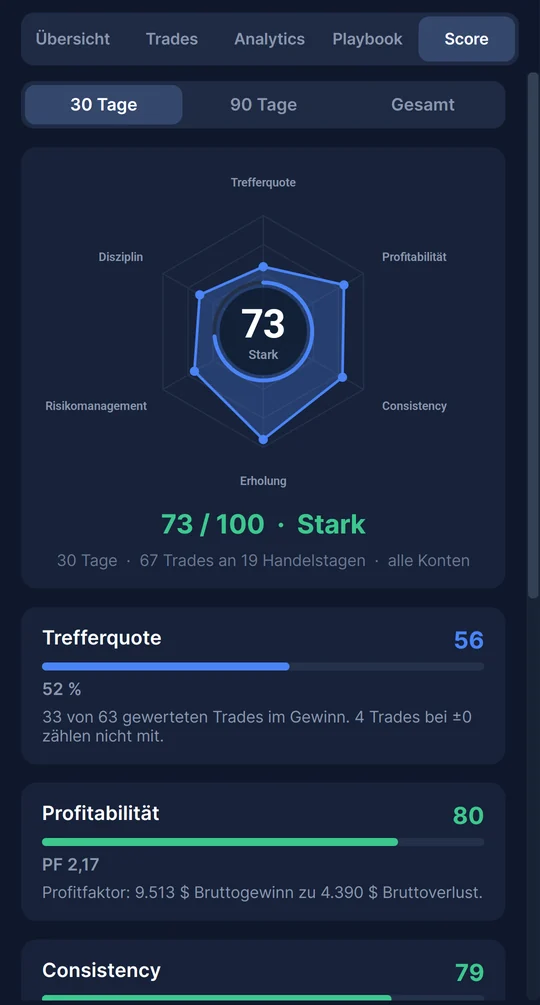
EdgeChartsTrades
Trade Score
Trade ScoreWin rate, profitability, consistency and discipline in one score.
EdgeChartsTrades
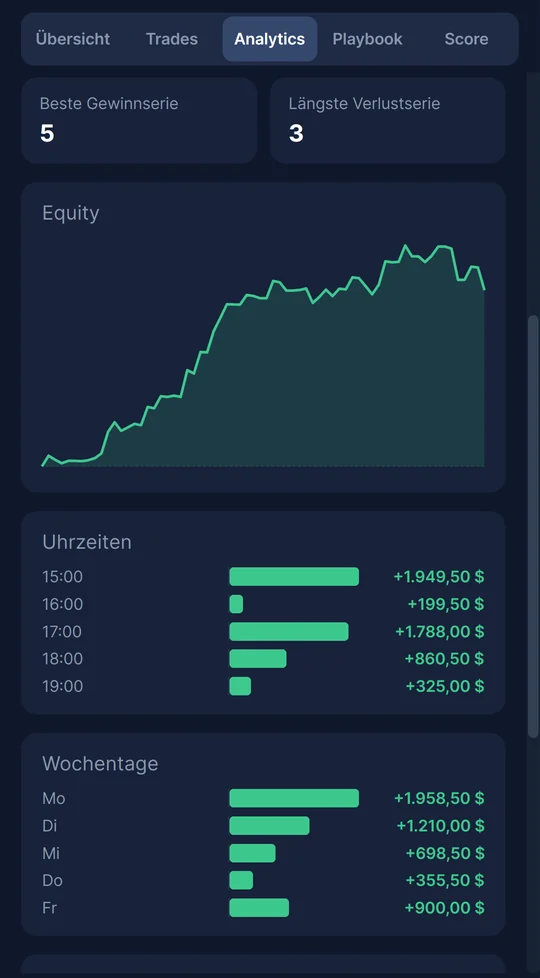
Analytics
AnalyticsEquity curve, best hours and weekdays – from your own fills.
EdgeChartsTrades
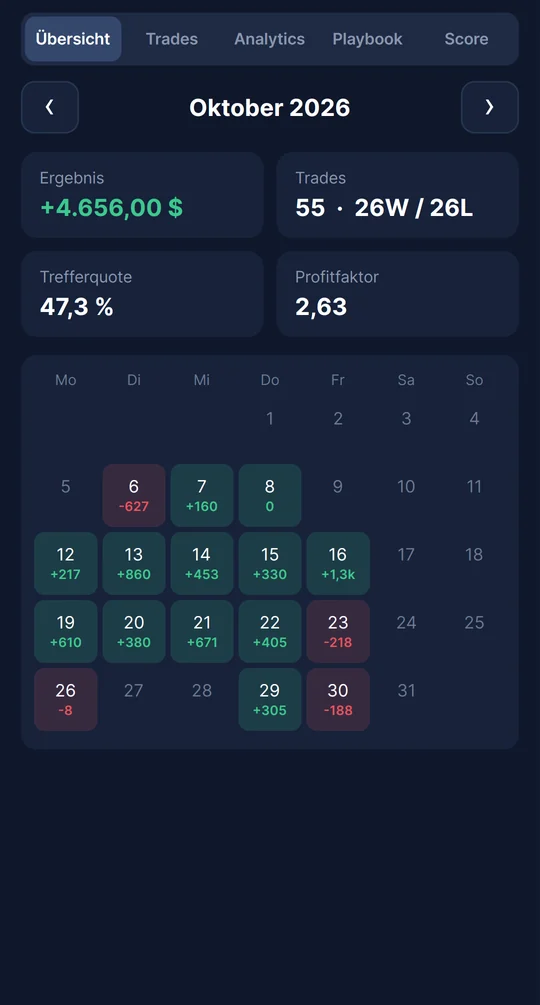
Calendar
CalendarEvery trading day at a glance, with result, win rate and profit factor.
EdgeChartsPlaybook
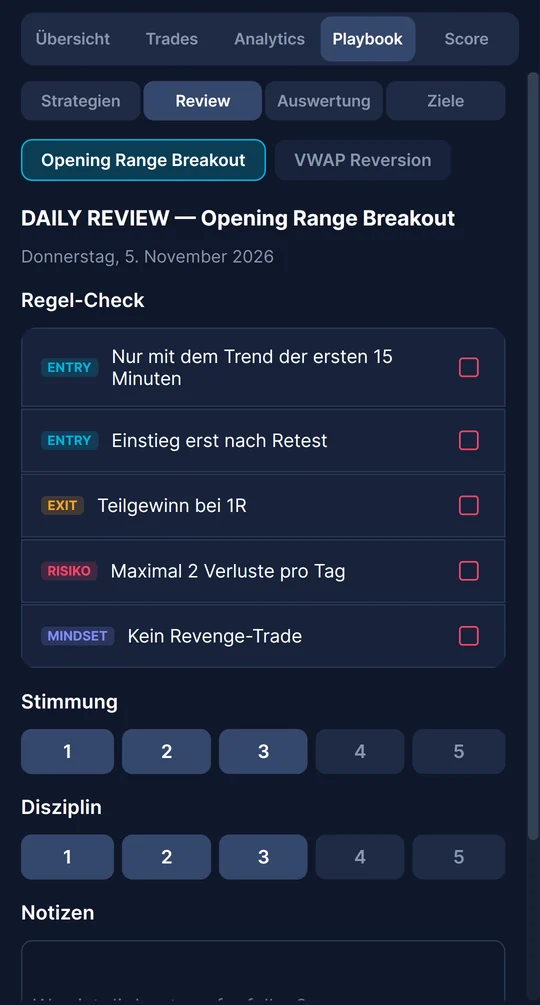
Daily review
Daily reviewCheck your rules, rate mood and discipline, take notes.
EdgeChartsPlaybook
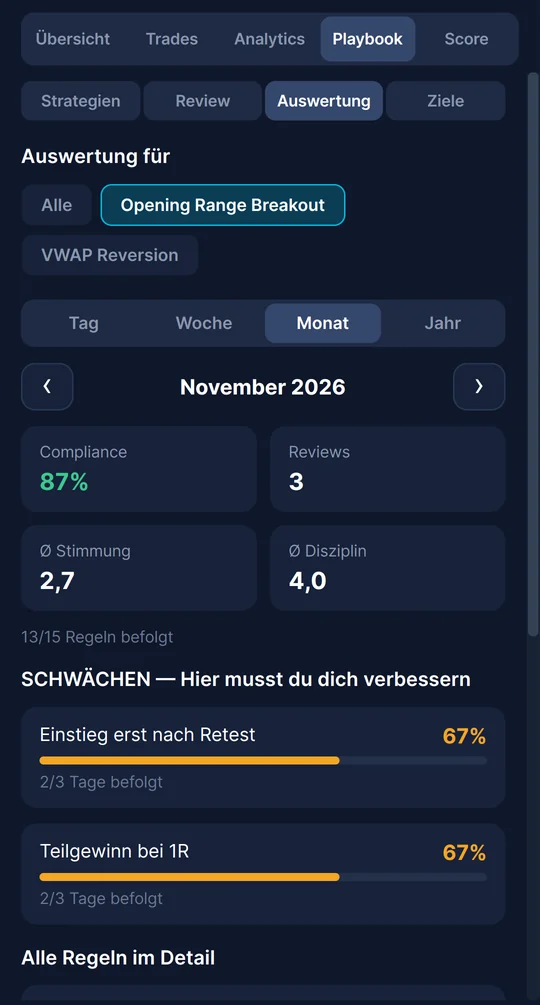
Rule report
Rule reportSee which rules you keep – and where you need to improve.

What the app can do

Charts and footprint

The same chart engine as on the desktop: seconds to daily, tick and Renko, footprint and your indicators – with the settings from your PC.

Heatmap and DOM

Live market depth (Level 2) as a heatmap and as a DOM ladder. Pinch to zoom, double-tap to jump back to live.

Trade on the go

Place orders from the DOM or the chart, drag order lines, flatten with one tap. Every order is confirmed, and real accounts stay locked until you unlock them.

Trade Copier

See what is being copied per market and manage your copy groups. Hand the copier over from your PC to your phone and back (preview).

Journal and Playbook

Your trades from the Rithmic fills with overview, analytics and Trade Score – plus strategies, daily review and goals from your playbook.

Everything else

Dashboard with today's P&L, the economic calendar, Asset Scores, Community, TradeArena and the videos.

What you need

Phone
iPhone with iOS 17 or newer · Android 8.0 or newer
Account
Your EdgeCharts login. A new phone is unlocked with a 6-digit code sent by email and counts as one of your 3 devices.
Market data
Your own Rithmic account or a dxFeed / Volumetrica prop account – the same as on the desktop.
PC
Not needed. The app connects to your data feed by itself. You only need the desktop app to install indicators and algorithms.

Good to know

  • The heatmap on the phone shows what the phone has recorded since you opened it – there is no order book history from the server.
  • The copier on the phone only runs while the app is in the foreground. For copying all day, leave it on the PC.
  • Tick charts load up to 3 days, Renko up to 1 day.
  • Desktop only: Replay, Options Heatmap, Prop Calculator and installing indicators.
  • iPad is not supported yet.

Your charts.
Wherever you are.